Section 1: The Problem
Images now carry essential information about products, news, workplaces, entertainment, and everyday life. For blind and low-vision users, that information is often available only when someone adds alternative text that a screen reader can speak aloud. At least 2.2 billion people worldwide live with near or distance vision impairment, while unaddressed vision impairment creates an estimated $410.7 billion in annual global productivity losses (World Health Organization).
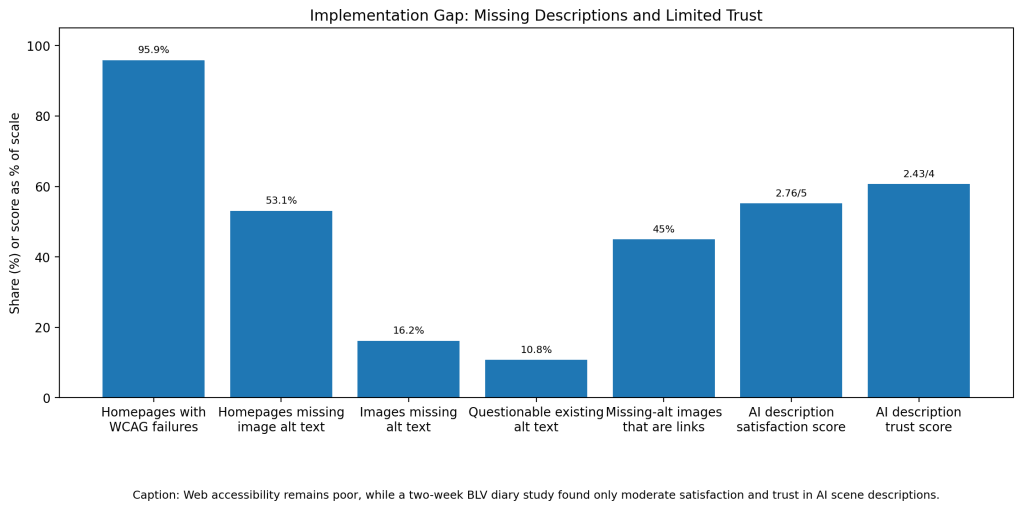
The web is still built around the assumption that users can see. WebAIM examined one million popular homepages in 2026 and found 56.1 million detectable accessibility errors. More than 95% of pages had detected WCAG failures, and 53.1% had images missing alternative text. Across 66.6 million images, 16.2% lacked alt text and another 10.8% had descriptions such as filenames, “image,” or repeated text that provided little useful information (WebAIM).
Traditional alt text depends on website developers, writers, or social-media users remembering to describe every meaningful image. That approach does not scale. Researchers studying Twitter data estimated that as many as 98% of uploaded images lacked alt text, leaving screen readers to announce only that an unidentified “image” was present (Srivatsan et al.).
Section 2: What Research Shows
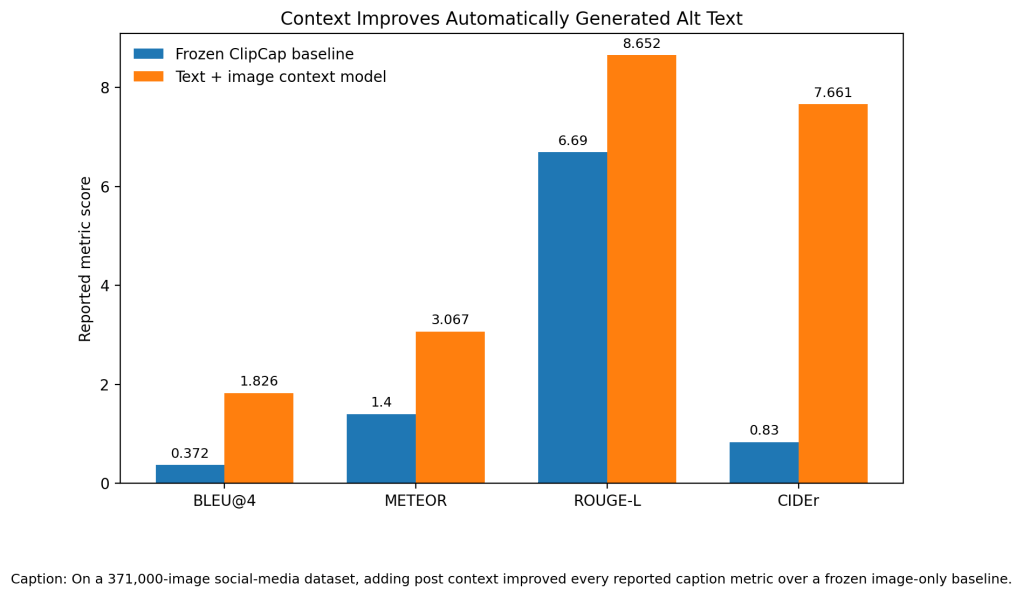
Modern vision-language models can generate descriptions automatically, but context changes whether those descriptions are useful. Srivatsan and colleagues created a dataset of 371,000 Twitter images paired with posts and user-written alt text. Their model combined information from the image with the accompanying post instead of analyzing the picture alone (Srivatsan et al.).
The contextual model reached a BLEU-4 score of 1.826 compared with 0.372 for a frozen ClipCap baseline. It also improved CIDEr from 0.830 to 7.661. In a human evaluation of 954 examples, reviewers preferred the contextual model over frozen ClipCap for descriptiveness in 66.9% of cases, compared with 26.2% for the baseline (Srivatsan et al.).
Those scores do not prove the descriptions meet blind users’ needs. Leotta, Mori, and Ribaudo asked 76 participants to evaluate 2,280 descriptions from automatic captioning services and Wikipedia. Human-written Wikipedia descriptions still received the strongest overall evaluations, although individual automated tools performed well for certain image categories (Leotta et al.).
Section 3: What the Real World Shows
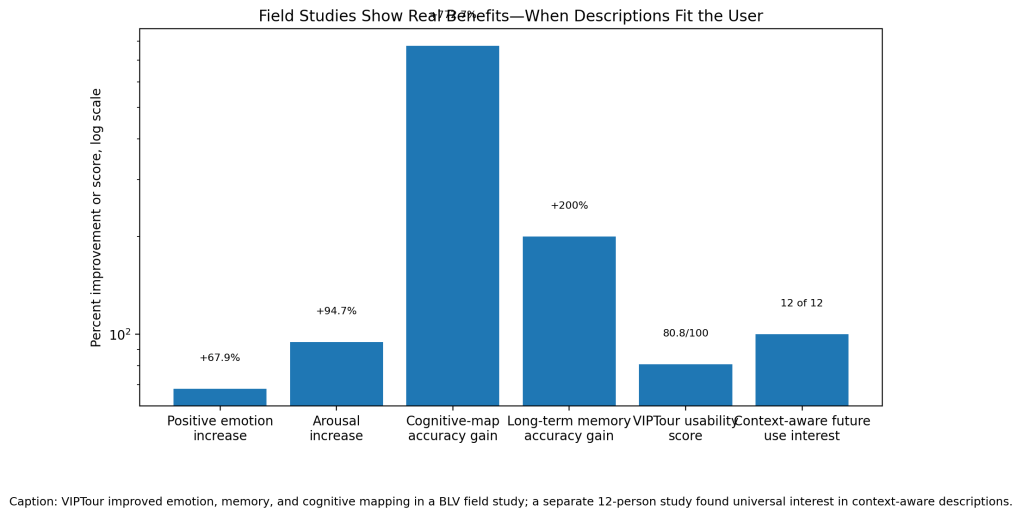
The most striking field evidence comes from VIPTour, an AI system designed to help blind and low-vision people experience unfamiliar environments. Researchers evaluated it with 46 participants during park exploration, recollection, and communication activities. Participants gave the system usability scores of approximately 80 out of 100 (Lin et al.).
VIPTour increased positive emotional responses by 67.9%, arousal by 94.7%, cognitive-mapping accuracy by 772.73%, and long-term memory accuracy by 200%. Instead of naming every visible object, it organized information around personal interests, novelty, relationships, and practical needs (Lin et al.).
Context also improved web descriptions. Mohanbabu and Pavel tested a browser extension with 12 blind and low-vision participants. Descriptions generated using the surrounding webpage were rated significantly higher for quality, relevance, imaginability, and plausibility than descriptions based on the image alone. All 12 participants said they wanted to use context-aware descriptions in the future (Mohanbabu and Pavel).
Section 4: The Implementation Gap
The first barrier is hallucination. Image-captioning systems can confidently misidentify an object, omit something important, or invent a quantity. Yu and colleagues tested one commercial API and five advanced captioning models using 1,000 seed images. Their system uncovered 16,825 caption errors with precision ranging from 84.9% to 98.4% (Yu et al.).
The second barrier is misplaced trust. Gonzalez and colleagues conducted a two-week diary study in which 16 blind and low-vision participants used an AI scene-description application. Participants found valuable uses, including checking familiar objects and avoiding dangerous items, but rated satisfaction only 2.76 out of 5 and trust 2.43 out of 4 (Gonzalez et al.).
A wrong description can be worse than no description when the user does not know it is wrong. Misreading a shirt color is inconvenient. Misidentifying medication, traffic, food ingredients, controls, or a hazardous object can create real danger. Current systems rarely communicate which details are observed directly, inferred from context, or uncertain.
The third barrier is organizational adoption. Chemnad and Othman screened 3,706 papers for a 2024 systematic review and retained 43 studies on AI and digital accessibility. They found that research focused heavily on visual impairment but often failed to follow accessibility standards or involve users consistently in system design (Chemnad and Othman).
Section 5: Where It Actually Works
AI descriptions work best when users can ask follow-up questions and control the level of detail. Someone shopping online may care about color, condition, dimensions, and layout. Someone reading news may need identities, expressions, signs, and surrounding events. A generic sentence such as “several people standing outside” may be technically correct but still useless.
The strongest systems also keep human support available. AI can provide an immediate first description, flag its uncertainty, and then let the user request more detail or contact a trusted person when the decision carries risk. Context-aware tools succeed because they treat description as a communication task rather than simply listing objects.
Section 6: The Opportunity
The opportunity is not to replace human-written alt text. It is to make inaccessible images less common while giving blind users more control over what they hear. Platforms should generate draft descriptions, show creators what is missing, use surrounding context, label uncertainty, preserve human editing, and support follow-up questions. An AI system that describes everything confidently is not accessible. A system that explains what it knows, what it may have missed, and when to ask a person could be.
References
[1] World Health Organization. “Blindness and Vision Impairment.” WHO Fact Sheets, 2026.
[2] WebAIM. The WebAIM Million: The 2026 Report on the Accessibility of the Top 1,000,000 Home Pages. 2026.
[3] Srivatsan, Nikita, et al. “Alt-Text with Context: Improving Accessibility for Images on Twitter.” International Conference on Learning Representations, 2024.
[4] Leotta, Maurizio, Fabrizio Mori, and Marina Ribaudo. “Evaluating the Effectiveness of Automatic Image Captioning for Web Accessibility.” Universal Access in the Information Society, vol. 22, 2023, pp. 1293–1313.
[5] Mohanbabu, Ananya Gubbi, and Amy Pavel. “Context-Aware Image Descriptions for Web Accessibility.” Proceedings of the 26th International ACM SIGACCESS Conference on Computers and Accessibility, 2024.
[6] Gonzalez, Ricardo, et al. “Investigating Use Cases of AI-Powered Scene Description Applications for Blind and Low Vision People.” Proceedings of the 2024 CHI Conference on Human Factors in Computing Systems, 2024.
[7] Lin, Haozhe, et al. “AI System Facilitates People with Blindness and Low Vision in Interpreting and Experiencing Unfamiliar Environments.” npj Artificial Intelligence, vol. 1, 2025.
[8] Chemnad, Khansa, and Achraf Othman. “Digital Accessibility in the Era of Artificial Intelligence—Bibliometric Analysis and Systematic Review.” Frontiers in Artificial Intelligence, vol. 7, 2024.
[9] Yu, Boxi, et al. “Automated Testing of Image Captioning Systems.” Proceedings of the 31st ACM SIGSOFT International Symposium on Software Testing and Analysis, 2022.
[10] Kreiss, Elisa, et al. “Context Matters for Image Descriptions for Accessibility: Challenges for Referenceless Evaluation Metrics.” Proceedings of EMNLP, 2022.


Leave a Reply